DJI Pocket 4P only.
CamSynq has been tested with DJI Pocket 4P only. Pocket 4 and future Pocket models may work, but compatibility and available features have not been verified and cannot be guaranteed.
Turn supported DJI Pocket cameras into a coordinated multi-camera studio system, with pan, tilt, zoom, presets and production-control integrations.
Tested with DJI Pocket 4P only.Check camera compatibility & gimbal guidance ↓
Multi-Camera Control for DJI Pocket 4P by willdylan.tv
 ● THREE-CAMERA WORKFLOW
CamSynq has been tested with DJI Pocket 4P only. Pocket 4 and future Pocket models may work, but compatibility and available features have not been verified and cannot be guaranteed.
Pocket cameras use a stabilising gimbal rather than a dedicated PTZ mechanism. Slight framing drift can occur, so allow for occasional framing adjustments, especially during longer static shots.
Precise, drift-free positioning is not guaranteed.
In our current Pocket 4P testing, Gimbal Lock can make drift more noticeable. Test your camera and firmware combination before production and monitor framing during use.
Behaviour may change with future DJI firmware; any improvement and its timing depend on DJI.
Camera settings, a gimbal joystick, zoom, recording and saved positions share one production workspace.
CamSynq Pocket Studio · Control workspace
Give each Pocket camera a role, save your framing, and control the system from one production position.
Recall a close-up, adjust framing and zoom without walking to the camera.
Move between saved positions or make fine PTZ adjustments during the session.
Keep a wide master shot ready for transitions, resets and two-person conversations.
Bring supported DJI Pocket cameras into one control workspace.
Set host, guest, wide and other repeatable positions.
Adjust cameras from the interface or your production-control buttons.
Three cameras. Wireless video. Dedicated Wi-Fi control.
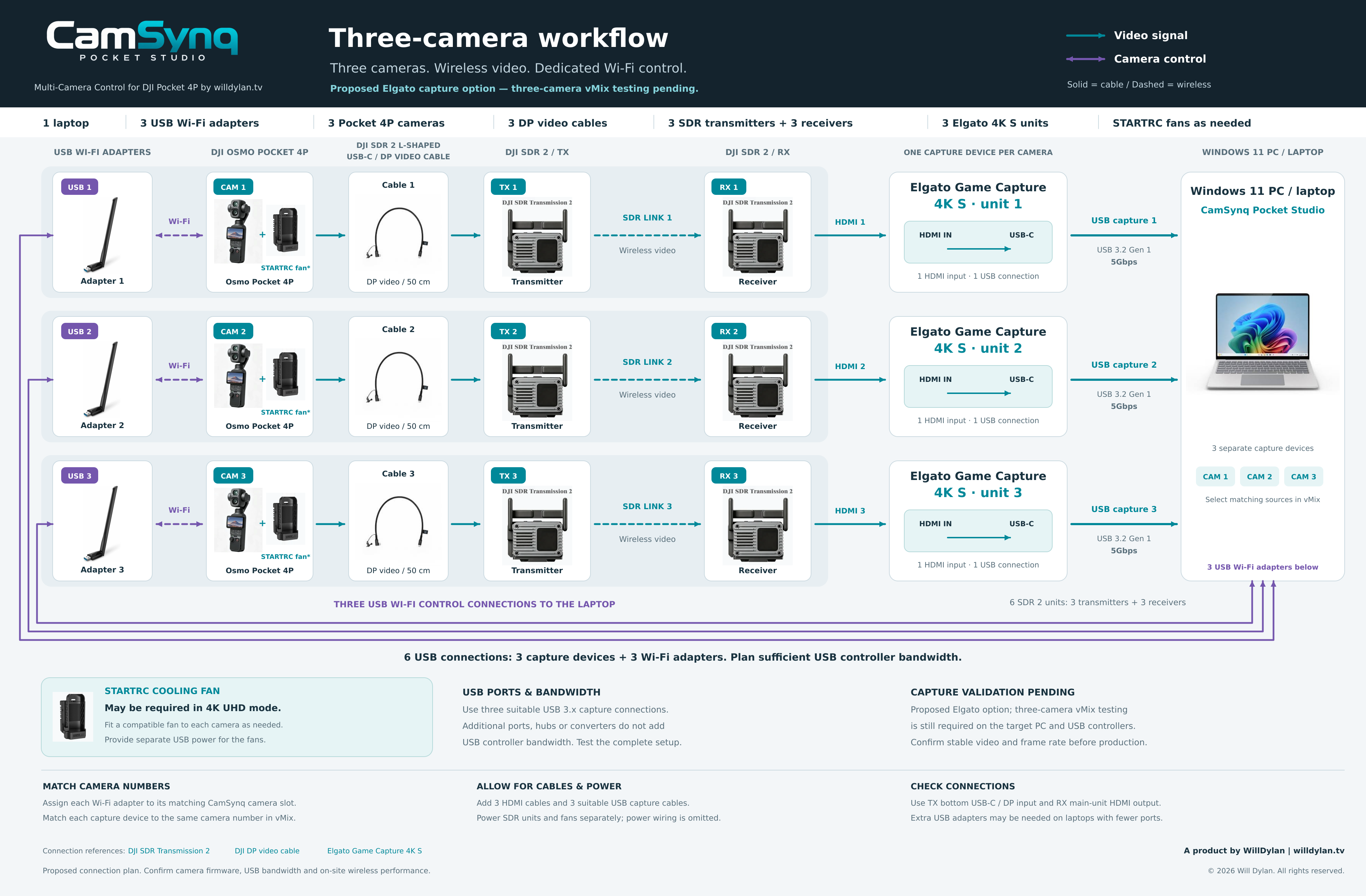
The diagram proposes one Elgato Game Capture 4K S per camera. The complete three-camera configuration has not yet been validated in vMix. Test it with your PC, cables and intended video settings before production.
Plan your connections before production.Additional USB Wi-Fi adapters are required for multi-camera operation: each camera needs its own dedicated Wi-Fi adapter. For the three-camera workflow shown, use 3 USB Wi-Fi adapters and keep the laptop’s built-in Wi-Fi available for internet access.
Give each camera its own transmitter and receiver, then bring all three feeds into the laptop.
One capture device per camera.Repeat the camera → TX → RX chain three times. Use one DJI SDR 2 L-shaped USB-C / DP video cable per camera, then connect each receiver’s HDMI output to its own Elgato Game Capture 4K S HDMI input.
Three capture connections to the computer.Connect each Elgato unit separately over USB 3.2 Gen 1 (5 Gbps) or better, using a suitable data cable. Label the capture sources 1, 2 and 3 to match your cameras. View Elgato specifications ↗
Keep a dedicated Wi-Fi connection for each camera.
USB Wi-Fi adapters are required for multi-camera control.Connect one dedicated adapter per camera. Built-in Wi-Fi plus 2 USB adapters can serve 3 cameras; the recommended 3-USB-adapter setup keeps built-in Wi-Fi free for internet. A single Wi-Fi adapter cannot maintain all three camera connections at once. Video feeds use the separate SDR and capture path above.
Plan USB connections and controller bandwidth.This setup uses 3 USB capture connections plus 3 USB Wi-Fi adapters. USB-A / USB-C converters or a powered hub / dock may be needed, especially on laptops. Prefer direct USB ports for capture and check how ports share USB controllers. Extra ports, hubs and converters do not add controller bandwidth; test all three feeds together.
Allow for cables & powerUse 3 DP video cables, 3 HDMI cables and 3 USB capture data cables rated for 5 Gbps or better. Provide power for all six SDR units and any cooling fans.
Use the correct video portsUse each transmitter’s bottom USB-C / DP input and each receiver’s main-unit HDMI output.
Check your complete setupValidate all three capture feeds together in vMix at your intended resolution and frame rate for a full session. Test simultaneous video and CamSynq control, USB bandwidth and on-site wireless performance.
Plan cooling for 4K UHDA compatible STARTRC fan may be required for Pocket 4P in 4K UHD, especially during long sessions or in warm conditions. Allow for separate fan power and test before production.
Prepare your Windows PC or laptop, software and camera connections before downloading CamSynq Pocket Studio.
The complete portable ZIP includes the fixed Windows launcher, activation / deactivation screens, bundled runtime, CamSynq Companion module v1.2.3, camera-control page files and setup instructions.
For Companion control, install the separate Bitfocus Companion app, then import the included module package. Existing users should select v1.2.3 in each CamSynq connection and save; existing pages can stay in place. This update fixes the incorrect disconnected / “start 0.15.1” message.
Close CamSynq before updating, extract the ZIP to a new folder and open CamSynq Pocket Studio.exe. Keep your existing licence and profile data on the same PC. Test your complete setup before production.
Plan a Windows computer with enough headroom for your camera-control workspace and any production applications you run alongside it.
| Component | Recommended specification |
|---|---|
| Operating system | Windows 11, 64-bit, on an Intel or AMD PC or laptop. |
| Processor (CPU) | Windows 11-supported Intel Core i5 / AMD Ryzen 5 class processor or better, with 4 or more cores recommended. |
| Memory (RAM) | 16 GB RAM or more recommended. Consider 32 GB or more when the same computer also handles multi-camera video production. |
| Storage | SSD with at least 2 GB free recommended for CamSynq extraction, updates and working files. Allow additional space for Windows, Companion, other applications and recordings. |
| Graphics (GPU) | Modern integrated or dedicated graphics with current Windows drivers for camera control. For video mixing, streaming or virtual production, choose a GPU that meets your production software’s requirements. |
| Display | Full HD (1920 × 1080) or higher recommended for the multi-camera workspace. |
Apple / Mac compatibility: This release is designed for Windows 11 on Intel/AMD PCs. It has not been developed or tested for macOS or Apple devices, so Apple/Mac compatibility cannot be guaranteed. Windows on ARM is not supported by this release.
Running video production on the same computer? vMix, OBS, Aximmetry, recording and high-resolution video outputs can need substantially more CPU, GPU, RAM, storage and USB bandwidth. Follow those applications’ hardware requirements and test your complete setup before production.
The hardware figures above are recommended planning guidance for CamSynq camera control; tested minimum CPU/RAM specifications and guaranteed multi-camera video performance have not yet been established.
This release does not support Windows 10 or Windows on ARM. Check performance with your complete camera, capture and streaming setup before production.
Install the stable Windows 64-bit version of Companion 4.x on the same PC as CamSynq, then import the supplied CamSynq Companion module v1.2.3.
Companion is a separate app. The module version is not the Companion app version. Companion is required for this integration; basic CamSynq camera control works without it.
Download Bitfocus CompanionOn the official download page, select a stable 4.x release for Windows 64-bit. The supplied module requires Companion 4.0 or newer and this release targets stable 4.x. Companion 5.x has not been validated for this CamSynq release.
Camera movement, repeatable framing and hands-on production control, brought together for a compact studio.
Direct camera movement and framing from a central control station.
Store and recall shots for hosts, guests, products and wide angles.
A practical multi-camera layout for podcasts, interviews and compact studios.
Put common camera actions and preset recalls under physical buttons.
Bring camera actions into your wider live-production control workflow.
Use camera movement data in compatible virtual-production workflows.
Build around the tools you already use to control cameras, switch shots and produce your show.
Host, guest and wide shots controlled from one desk. Keep attention on the conversation.
Compact multi-camera acquisition with repeatable framing for speakers and interviewees.
Coordinate Pocket cameras alongside switching and stream-control tools for your live production.
Start with the complete three-camera workflow in a single licence.
One edition for your 1–3 camera setup.
Planned launch pricing. Final pricing and included features may change before release.
Join the early-access list for launch news, beta availability and the introductory price.
